|
Features
| Parse any log format |
LogMX uses a set of Parsers in order to read any log format. You can easily create new LogMX parsers to open your own log files, if they are not in a 'standard' format (LogMX comes with default parsers handling Log4j v1/v2, Java Logging, Logback, LogFactor5, Eclipse RCP, and Syslogs formats). LogMX auto-detects the Parser to use while the file is loading, you don't have to select a format to open a log file. And if a log file is compressed (zip/gzip/tar/bz2/lzma/xz), LogMX will automatically decompress it on the fly before parsing.
If LogMX does not find a suitable Parser for a file, it will show you the file content in plain-text.
You can create different types of LogMX parsers, depending on your log format and/or your technical skills:
| More powerful parsers |
| |

|
 |
 Java Class Parser >>Screenshots
Most powerful parser type: write a single Java class that takes lines of text as input and parse them as log entries. Such parsers can handle optional entry fields, merge/transform fields, collect statistics, use external resources,…
Build scripts, samples, and Ant/Maven/Gradle/Eclipse/IntelliJ development environments included.
|
 |
 Regex (Regular Expression) Parser >>Screenshots
Describe your log format using a single regular expression (Java syntax almost the same as UNIX/PHP/Perl/Python): comparing to Log4j Pattern parsers, you will be able to handle optional fields, and ignore fields more easily.
|
 |
 Log4j/Logback Pattern Parser >>Screenshots
Describe your log format with a single Pattern using the Log4j or Logback Pattern syntax. Such parsers can also read files that were not produced by Log4j/Logback: the Log4j/Logback Pattern syntax is proposed for those who do not want to use Regular Expression Patterns. Trivial to set up when Log4j or Logback is actually used to produce logs. Ignoring some log entry fields is possible using tags settings.
|
 |
 Simple Parser >>Screenshots
Simplest parser type to set up for user-defined log formats: no syntax knowledge required, simply describe your log format using a graphical editor (log entry fields orders, fields separators …). Unlike with Log4j Pattern parsers, ignoring some log entry fields is not possible.
|
 |
 JSON Parser >>Screenshots
Simply list the JSON fields you want to extract from your logs (only works with JSON logs). Can extract nested JSON objects and array elements. Can also process streamed JSON fragments (i.e. the whole log file/stream doesn't have to be a valid JSON object/array).
|
 |
 Built-in Parsers (common log formats)
LogMX comes with several built-in parsers for the following common log formats: Log4j HTML/XML/JSON, Java Logging XML/Text, Logback, LogFactor5, Eclipse RCP, Syslogs. No setup required, simply open your log file and that's it.
|
| Easier to set up parsers |
| |
|
| Access your logs anywhere they are |
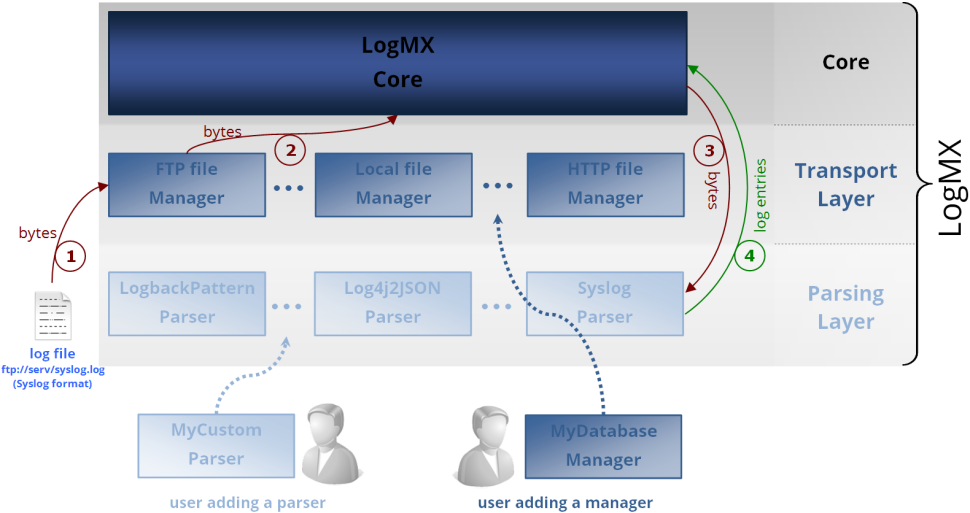
LogMX uses a set of log Managers in order to access logs anywhere they are. LogMX comes with a local file manager and several remote-file managers (SFTP/SCP, FTP/FTPS, Elasticsearch, HTTP/HTTPS, TCP/UDP, CIFS/SMB, Serial ports). Like for Parsers, you can create your own Managers to read your logs anywhere they are (Oracle DB, private Cloud, POP3, ...).
Some Managers read/monitor local or remote files, others read/monitor entire local/remote directories (virtually merging all directory files in a single view, taking into account file creation/deletion), and others read from sockets, serial port, or any data source.
To create a new Manager, you will just have to write a single Java Class implementing some abstract methods (build scripts and development environment already included). |
| Monitor logs in real-time without reload |
| When 'AutoRefresh' mode is turned on, LogMX will display the log file content in real-time: you can now monitor your software by directly looking at its logs in real-time. This mode avoids several full file reloads to look at logs while written. A 'tail' option can also be activated in AutoRefresh mode to display only the last log entries (useful for saving RAM with huge files). >>Screenshots |
| Easily filter, sort and search anything in very large files |
With just a click, you can hide or show log entries matching one or more conditions on any log entry field (emitter, log level, thread, ...). For example, you can display only log entries that are ERRORs or WARNINGs written by a thread containing 'oracle' in its name. >>Screenshots
LogMX also provides a powerful Search feature: you can search a simple text or a regular expression in the scope of your choice (all file entries, only displayed entries, only selected entries) and in the entry field(s) of your choice (date, text, level, ...). >>Screenshots |
| Handle very large files |
| In order to work with very large log files (e.g. several gigabytes) LogMX can display, in real-time, only the end of the log file thanks to its AutoRefresh feature. If you want to completely load the file, LogMX gives you a graphical state of your memory usage (you can choose the maximum amount of memory LogMX is allowed to use). >>Screenshots |
| Time computation (delta-t) |
| LogMX can compute the time elapsed between two log entries and the time elapsed since an entry was generated. No more painful and inaccurate mental calculations! Used accuracy depends on log file format (will be in milli-seconds if the log format uses milli-seconds, very useful for your benchmarks!). >>Screenshots |
| File merge |
| If your logs are produced by a distributed application (clustered environment) or if this application produces several log files, LogMX can open these files in a single merged view. You can then perform actions in a single file instead of processing all of them one by one. Two merge modes are available: entries sequentially appended, or entries interlaced to be sorted by date. >>Screenshots |
| Alerts / Notifications |
| If you don't want to monitor your log files for long periods, you can define alerts that will be triggered when the event you described occurs (e.g. "level is WARNING or more critical", "emitter is 'my_emitter'", "message contains 'fail'", ...). You can choose action(s) to be performed when such events occur: play a sound, give the focus to LogMX window, execute a program, or send a mail. You can set a limit so that too many alerts are not processed, but all these triggered alerts are logged so that you can see which entry produced this event. >>Screenshots |
| File flush |
| When you think your log file becomes too big, or when you want to re-start a logging session from scratch, you can empty it or delete it directly in LogMX (if you try to delete a file locked by another process, LogMX will tell you and ask you if you want to flush it instead). >>Screenshots |
| File export |
| LogMX can export any log file to a CSV, HTML, XML, or JSON file. You can also export only displayed, selected, marked, or found log entries, and choose which entry field(s) to export (very useful to export logs without dates in order to compare two log files). >>Screenshots |
Here is how LogMX was designed to read any log format, from any data source:
|